Introduction
opencode reads its settings from ~/.config/opencode. That folder holds global instructions, agents, skills, and MCP servers. It works well, but it sits outside Git: no history, no review, and no easy way to set up a second machine.
This article shows a simple fix. Keep the files in a Git repository, and link them into ~/.config/opencode. The repository becomes the only place you edit, and every machine reads the same files.
The complete example is in mustapha-zouari/blog8-opencode-config.
The Configuration Folder
What Lives in the Folder
| Path | Purpose |
|---|---|
opencode.json or opencode.jsonc | Models, providers, permissions, MCP servers |
AGENTS.md | Global instructions for every session |
instructions.md | Optional extra instructions referenced by the config |
agents/ | Subagent definitions |
skills/<name>/SKILL.md | Reusable procedures, loaded on demand |
plugins/ | Optional extensions |
secrets.env | Credentials used by the configuration |
Everything except secrets.env can go to Git. A project-level opencode.json(c) and .opencode/ folder are merged on top of these global settings, so a project can override them.
opencode 2 prefers agents/ and still discovers the older agent/ directory.
The Pattern
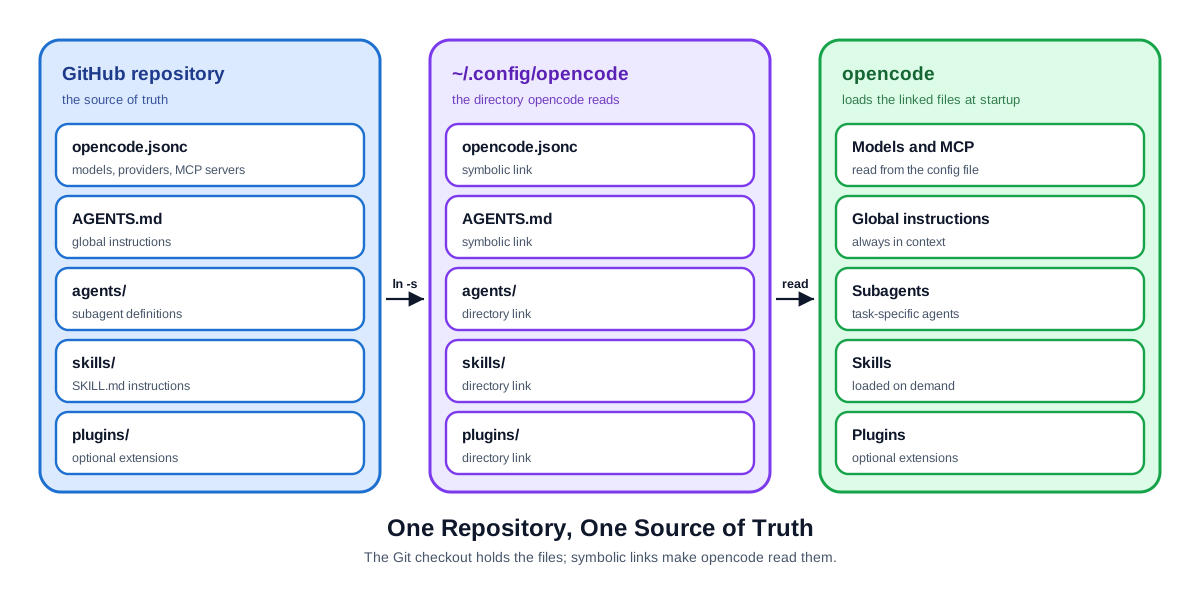
Three rules:
- The repository holds the real files.
~/.config/opencodeholds links to them.- A new machine needs a clone and one script run.
Repository and Setup
The Repository
The repository is a template, so you can clone it or use it as the starting point for your own.
git clone https://github.com/mustapha-zouari/blog8-opencode-config.git "$HOME/SourceRepo/blog8-opencode-config"blog8-opencode-config/
├── opencode.jsonc
├── AGENTS.md
├── README.md
├── LICENSE
├── agents/
│ ├── reviewer.md
│ └── issue-reporter.md
├── skills/
│ ├── git-commit/
│ │ └── SKILL.md
│ ├── java-code-style/
│ │ └── SKILL.md
│ └── tech-documentation/
│ └── SKILL.md
├── secrets.env.example
├── setup.sh
└── .gitignoreThe paths match the folder opencode reads, so every link is a one-to-one mapping.
Linking the Files
Use directory links for folders that grow. A new skill is a new folder inside skills/, and it appears without a new link. Use file links for single files, because the target folder also holds local files, such as secrets.env, that must stay out of Git.
repo="$HOME/SourceRepo/blog8-opencode-config"
target="$HOME/.config/opencode"

ln -s "$repo/agents" "$target/agents"
ln -s "$repo/skills" "$target/skills"
ln -s "$repo/opencode.jsonc" "$target/opencode.jsonc"
ln -s "$repo/AGENTS.md" "$target/AGENTS.md"
Check the result:
$ ls -l ~/.config/opencode
lrwxrwxrwx  agents         -> /home/me/SourceRepo/blog8-opencode-config/agents
lrwxrwxrwx  AGENTS.md      -> /home/me/SourceRepo/blog8-opencode-config/AGENTS.md
lrwxrwxrwx  opencode.jsonc -> /home/me/SourceRepo/blog8-opencode-config/opencode.jsonc
lrwxrwxrwx  skills         -> /home/me/SourceRepo/blog8-opencode-config/skills
-rw-------  secrets.env
Absolute links are easier to read and to debug. Relative links only survive when both folders move together. For a fixed checkout, use absolute links.
The Setup Script
The script must be safe to run more than once, and it must back up what it replaces.
#!/usr/bin/env bash
set -euo pipefail

repo="$(cd "$(dirname "${BASH_SOURCE[0]}")" && pwd)"
target="${OPENCODE_CONFIG_DIR:-$HOME/.config/opencode}"
mkdir -p "$target"

link() {
    local src="$repo/$1"
    local dst="$target/$1"

    if [ -L "$dst" ] && [ "$(readlink "$dst")" = "$src" ]; then
        echo "already linked: $1"
        return
    fi

    if [ -L "$dst" ]; then
        rm "$dst"
        echo "replaced stale link: $1"
    elif [ -e "$dst" ]; then
        mv "$dst" "$dst.bak"
        echo "backed up: $1 -> $1.bak"
    fi

    ln -s "$src" "$dst"
    echo "linked: $1"
}

for item in opencode.jsonc AGENTS.md agents skills; do
    link "$item"
done

echo "done: $target"
Run it from the repository:
"$HOME/SourceRepo/blog8-opencode-config/setup.sh"Add plugins to the list if you use it.
Secrets and MCP
Keeping Secrets Out
Credentials stay in one local file outside Git. Three rules:
- Commit
secrets.env.example, with names and empty values. - Ignore
secrets.envin.gitignore. - Reference variables in
opencode.json(c), never values.
Create the real file at ~/.config/opencode/secrets.env from the example, then fill in the values.
{
    "$schema": "https://opencode.ai/config.json",
    "mcp": {
        "servers": {
            "playwright": {
                "type": "local",
                "command": ["npx", "-y", "@playwright/mcp@latest"],
            },
            "github": {
                "type": "remote",
                "url": "https://api.githubcopilot.com/mcp/",
                "oauth": false,
                "headers": {
                    "Authorization": "Bearer {env:GITHUB_PAT_TOKEN}",
                },
            },
        },
    },
}
Playwright runs locally and needs Node.js. Install its browser once if it is missing. GitHub is a remote server. This example uses a PAT, so it sets oauth: false; to use OAuth, remove oauth: false and the headers block, then sign in through your client. Keep the PAT scoped to the repositories and actions the agent needs.
opencode replaces {env:NAME} from the shell environment at startup. If the variable is not set, the value becomes an empty string, so a missing export fails quietly. Load the file from your shell profile:
set -a
[ -f "$HOME/.config/opencode/secrets.env" ] && . "$HOME/.config/opencode/secrets.env"
set +aPortable MCP Entries
- Use command names from
PATH(npx,uvx), not version-pinned paths. The path breaks on the next upgrade. - Keep credentials in
{env:...}placeholders. - Use
disabled: trueto switch off a server on one machine instead of deleting it. - Treat every URL in a public repository as public. Put internal hosts in a private repository.
- Do not share a local database server with a hardcoded URL. Read the URL from an environment variable or keep the entry in a private repository.
avoid: /home/me/.nvm/versions/node/v22/bin/npx
use:   npx
Skills and Agents
Skills
A skill is a folder with a SKILL.md. The frontmatter needs name and description; the body holds the instructions.
---
name: git-commit
description: Use when committing, branching, or preparing a pull request. Defines Conventional Commits, branch naming, and the verify-before-commit gate.
---

# Git commits and branches

1. Read `git status` and `git diff`; stage explicit paths.
2. Keep one logical change per commit.
3. Use `<type>(<scope>): <subject>` with `feat`, `fix`, `docs`, `test`, `refactor`, `chore`, `perf`, or `ci`.
4. Branch from the default branch: `feat/<topic>`, `fix/<topic>`, `docs/<topic>`.
5. Run the project's verification command before committing code.
6. Never commit secrets, dependencies, or generated files.
The reference repository also shares two style skills:
| Skill | What it enforces |
|---|---|
java-code-style | var when obvious, final, SOLID, small methods, domain-specific names |
tech-documentation | Concise Markdown, consistent terminology, Mermaid and clean SVG diagrams |
The shared git-commit skill is a generic version of a project-specific skill that referenced docs/CONVENTIONS.md and npm run verify. A skill that names a specific repository’s paths or commands belongs to that project, not the global config.
Agents and Subagents
An agent is a Markdown file with frontmatter and a system prompt. Set mode: subagent so the primary agent can launch it as a child session.
---
description: Reviews changes for correctness, regressions, and missing tests. Read-only.
mode: subagent
permissions:
    - action: edit
      resource: '*'
      effect: deny
---

Review the current diff. Report findings in severity order with file and line references. Do not modify files.
The description matters: the primary agent reads it when choosing which subagent to launch. Keep it specific and start with the action.
The reference repository also includes agents/issue-reporter.md. It uses the Playwright MCP server to reproduce browser bugs and the GitHub MCP server to open one issue with evidence.
Share generic agents globally. Keep agents that name internal paths, commands, or business rules in the project’s .opencode/agents/ folder. A project agent can read the project’s own skills and conventions without exposing them to every repository.
Sharing and Maintenance
Sharing with a Team
- Use a private repository if the configuration names internal systems. A public one is fine for generic skills.
- Everyone clones the reference repository or their own fork and runs the setup script. Nobody copies files.
- Review changes in a pull request. A skill or
AGENTS.mdchange alters agent behaviour. - Keep personal values, such as model choice, out of the shared file, or read them from environment variables.
Pitfalls
- Editors can replace the link — some tools save by writing a new file and renaming it. The rename replaces the link with a regular file, and edits stop reaching the repository. Check with
test -Landgit status. - Moving the repository breaks every link —
ls -lshows the old target. Run the setup script again; it replaces stale links. - Windows only — symlinks need Developer Mode or administrator rights. Junctions avoid that for folders, but not for the two file links. Linux, macOS, and WSL use normal symlinks.
Checking the Setup
ls -l ~/.config/opencodeshows links, not copies.- opencode starts and lists the expected agents, skills, and MCP servers.
opencode mcp listshows the Playwright and GitHub servers and their connection status.- Editing a skill changes
git statusin the repository. - A second machine, after a clone and the setup script, shows the same links.
Conclusion
Agent configuration is code. Put it in a repository and link it into place.
- Directory links for folders, file links for single files.
- A setup script that backs up instead of deleting.
- Secrets outside Git, referenced as environment variables.
- Portable MCP entries with commands from
PATH.
The reference repository is the starting point: clone it, run the setup script, and replace the example skills and agents with your own.
The result is one source of truth, history and review for free, and a new machine ready after a clone and one script run.